Heltec ESP32 Door Lock Notifier
Did I turn on the notification that my apartment door is locked?!
Table of Contents
Overview
About a year ago I’ve bought 2 Heltec’s ESP32 modules, and after checking them out if they work put them in a drawer where they stayed ever since. Thought it would be good to dust them off and give them a try, especially that I haven’t worked with Espressif microcontrollers before.
After some initial research on the MCU/module, an idea came to me to make as a mini learning project a door lock notifier. Ever once in a while I have that “did I lock the door or not?” moment with the apartment door, so that would be a good place to put the these modules to use.
ESP32
First, onto ESP32. In short, this is an MCU with 32b CPU and a whole bunch of peripherals, most notably integrated WiFi/BT module. Quick overview can be found on a Wiki page.
Its predecessor was ESP8266, most notably known through NodeMcu. For a comparison what has changed, there’s a comparison with ESP8266.
As for the ESP32-relevant information, the best repository is the esp32.net. There you can find -
- Chip/module portfolio
- How to do the development - Arduino IDE, ESP-IDF
In addition to this, TRM can be found on the Espressif official webpage.
Heltec WiFi LoRa 32
Module that I have at hands is the Heltec’s WiFi LoRa 32 module. Here’s how it looks live -
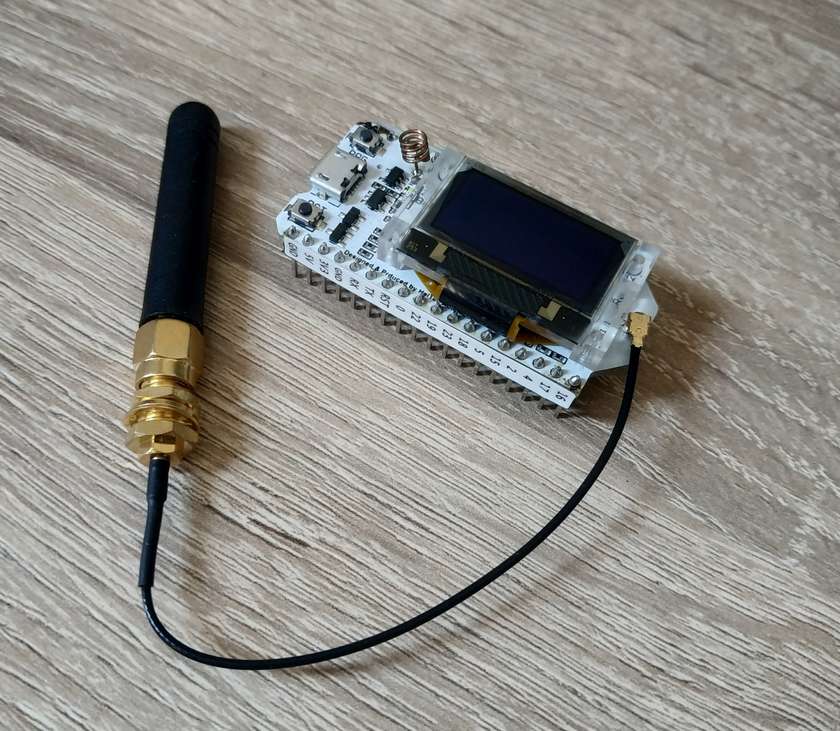
In addition to all the ESP32 goodies, it also incorporates the following features, first and the last found to be useful for this project -
- A small OLED display
- SX1276/1278 LoRa chip
- Lithium battery interface
Useful stuff on the module (pinout, schematics, lib examples) can be found on Heltec repos -
(Arduino) IDE
Next, the question is regarding the IDE for ESP32 modules, which one can be used. There are two reasonable options -
- Using Heltec’s ESP-IDF
- Using Arduino IDE
I’ve went with the second option because it seemed as a faster way to perform some quick prototyping. Here are some resources on setting up the work environment -
Door Lock Notifier
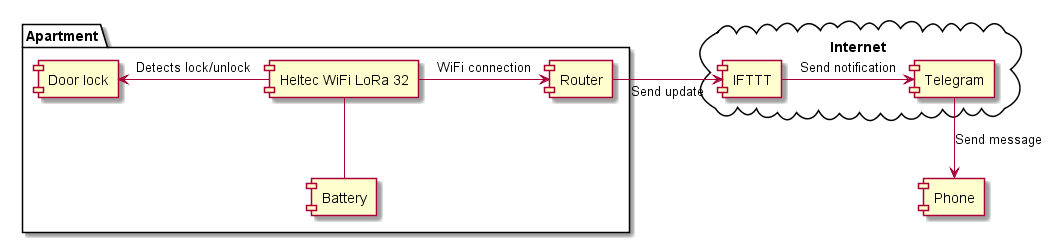
As for the mini project, the concept is following:
- Let the module somehow detect that the door has locked/unlocked.
- Upon detecting the change, connect to local Internet-enabled WiFi AP, through it to the IFTTT server, and send a POST request containing the update message.
- IFTTT will then using its Telegram bot generate a new message in the messenger.
- This message can then be observed via phone.
Here’s an overview of the system components -
Development Decisions
Detect Door Lock/Unlock
First question that appeared was - How to detect door lock/unlock event?
The preferred way would be to use the movement of the lock deadbolt to determine the transition between locked/unlocked state. This has a benefit that the perceived state can quite certainly correspond to the actual state.
As for detecting this transition, the straightforward way would be to use a micro switch installed in the door frame, so that it gets closed by a deadbolt going in the frame. But, the cheaper and faster option for the prototyping purpose is to use the fact that deadbolts are made of metal in order to be strong enough. Metal deadbolt, being conductive, can itself serve as a part of a switch. Additional hardware would then require just two additional leaf contacts leading to the used Heltec board pins. Here’s how it looks like from side -

Connection to IFTTT Server
For connecting to the IFTTT server WiFi Client example sketch has been used, spiced up with the example on how to do HTTPS connection.
Module Autonomy
As the module is running on a battery, it would be preferable to lower its power consumption so that it can operate for the extended period of time. Of course, connecting it on an USB adapter would be the best solution, but there were none close to the door and stretching the cables over the wall wasn’t an option.
Fortunately, ESP32 supports several power models, one of them being a deep-sleep one, with -
- ~6.5uA current consumption
- RTC memory persistence
- External wake-up source
- And most importantly for fast prototyping, Arduino example sketch
So, the solution was to use the door lock detection switch as a wake-up source, and set the wake-up level opposite of the last read out. Deep sleep Arduino example has been used as a basis for it.
System Components
Notification Mechanism
Notification chain for IFTTT looks like -
- Set up web request with
esp32_readingevent name. - Send message to Telegram private chat with IFTTT bot with following
format:
What: {{EventName}}<br>
When: {{OccurredAt}}<br>
Door status: {{Value1}}<br>
Notifier
Hardware outline is this -
- Connect Heltec board to battery and leaf-contact simulating wires.
- Use breadboard to hold everything together.
Here’s how it looks like -
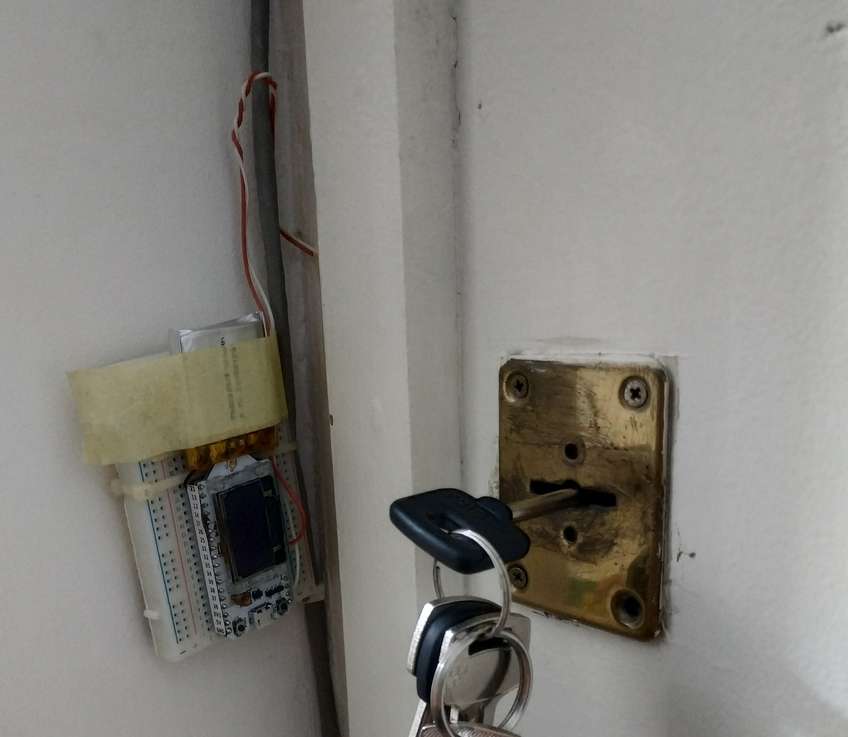
Here is the connection table for the used pins based on the pinout diagram:
| Pin | Use |
|---|---|
| GND | Leaf wire 1 |
| 0 (PRG button) | Leaf wire 2 |
As for the Arduino sketch, it’s uploaded to the GitHub repo.
Results
Here’s the live demonstration - YouTube video.
During the use, two main observed issues were:
- Sporadic triggering.
- Battery drain.
Resources
- esp32-wiki : Overview of MCU and the ESP32-based boards.
- esp32-net : Page with pretty much everything on ESP32.
- node-mcu : NodeMcu page.
- esp-comparison-table : ESP8266/ESP32 comparison table.
- esp32-hardware : Comprehensive overview of ESP32 chips and modules.
- esp32-development : Comprehensive overview of ESP32 development tools.
- esp32-trm : ESP32 technical reference manual.
- heltec-wifi-lora-32 : Heltec WiFi LoRa 32 module info page.
- module-resources : Module schematic, pinout.
- esp32-arduino-install : Arduino setup for ESP32 boards.
- heltec-esp32-arduino-lib : Installation procedure for Heltec ESP32 Arduino library.
- arduino-vscode-extension : VS Code Arduino extension.
- wifi-sketch : ESP32 WiFi client sample sketch.
- https-get-request : Guide how to create GET request over HTTPS.
- deep-sleep-sketch : ESP32 deep sleep sample sketch.
- sketch-repo : Sketch repo.